Chiropractic Adjustment and Desk Posture: How Better Ergonomics Can Reduce Neck, Back, and Shoulder Pain
A chiropractic adjustment is often part of a care plan for people dealing with neck pain, upper back tension, shoulder tightness, low back discomfort, and hip stiffness. For many patients, those symptoms are closely tied to long hours at a desk, especially when using a laptop with poor posture.
The good news is that a chiropractic adjustment works best when daily habits stop adding stress back into the spine. Small ergonomic changes can reduce strain on muscles and joints, improve comfort during work, and help the body hold better alignment for longer.
This guide explains what patients need to know about desk posture, laptop setup, foot support, simple stretches, and even driving posture, all through the lens of protecting the spine and supporting the results of a chiropractic adjustment.
Table of Contents
⚠️ Common mistakes that can undo the benefits of a chiropractic adjustment
✅ Takeaway for patients considering a chiropractic adjustment
🪑 Why desk posture matters for a chiropractic adjustment
Many people sit for hours with the head pushed forward, shoulders rounded, elbows planted on the desk, and the lower back collapsed. That position may feel normal, but it creates a chain reaction through the body.
When posture breaks down:
Neck and upper back muscles get overstretched and fatigued.
Shoulders and wrists absorb extra pressure from the desk.
Lower back and hips lose support and become strained.
Abdominal support switches off, which reduces core stability.
The pelvis shifts, making the spine compensate from the tailbone to the neck.
This is why someone may receive a chiropractic adjustment, feel relief, and then gradually tighten up again after another week of poor sitting habits. The issue is not just the chair. It is the whole working position.
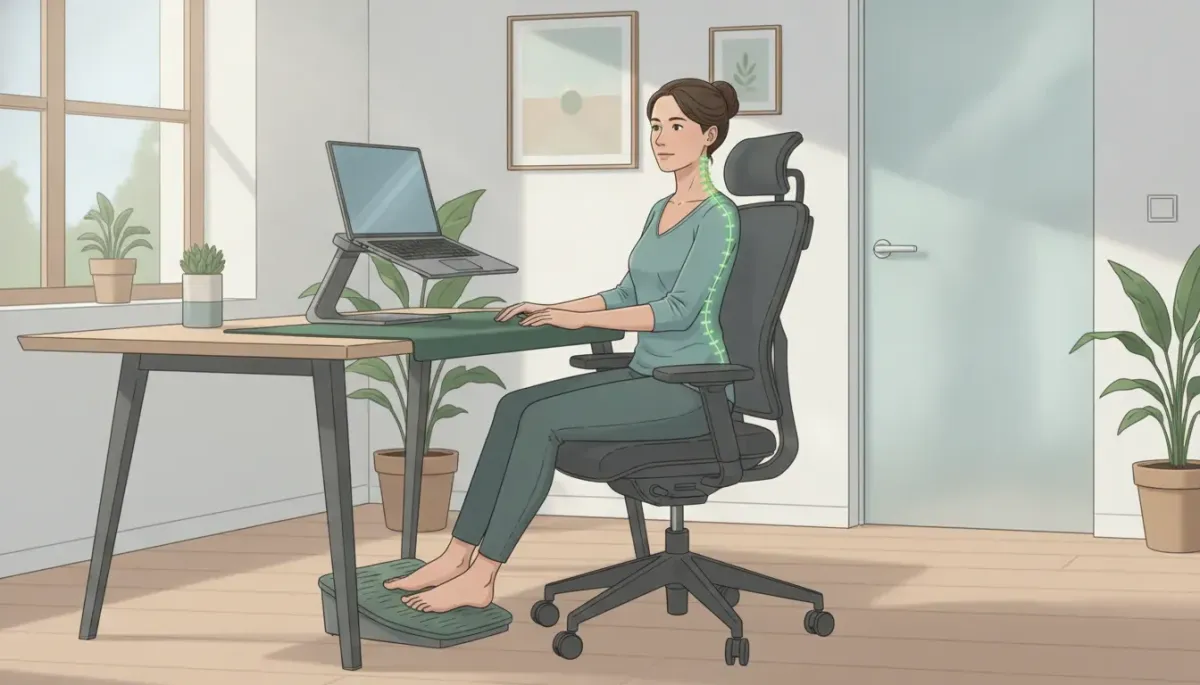
💡 What a good seated position should look like
A good workstation setup supports the body so the spine stays close to its natural curves. That creates a better environment for healing and can help a chiropractic adjustment last longer.
Key posture targets
Shoulder blades should rest against the back of the chair.
Buttocks should sit fully back in the chair.
Screen should be around arm’s length, roughly one and a half feet away.
Eye level should face straight ahead, not down toward a laptop.
Elbows should be near 90 degrees.
Hips and knees should be near 90 degrees.
Ankles should sit slightly forward in a neutral, relaxed position.
Feet should rest on a footrest or stable support.
Patients who tend to slide forward, cross their legs, hook a foot under the chair, or stretch the legs too far forward are often trying to find relief from poor pelvic positioning. That usually means the base of the spine is not well supported.
💻 Best laptop setup to support a chiropractic adjustment
A laptop by itself often encourages forward bending because the screen and keyboard are attached. If the keyboard is low enough to type on comfortably, the screen is usually too low for the neck.
That is why one of the best desk changes for many patients is to raise the laptop screen to eye level and separate the typing surface from the screen.
Recommended laptop setup
Use a laptop riser or stand to lift the screen.
Add an external keyboard.
Add an external mouse.
Keep the screen about one and a half feet away.
Type with the wrists and fingers on the desk, not the whole forearm.
Keep the arms relaxed near the sides of the body.
If the whole forearm is resting heavily on the desk, shoulder tension tends to build. A more neutral setup reduces unnecessary muscle work in the neck, chest, and upper back.
Patients dealing with forward head posture may also benefit from pairing spinal care with posture-specific habits such as those covered in this guide on tech neck posture correction.
🖥️ Using an external monitor the right way
Some patients prefer to use the laptop keyboard and touchpad but connect to a larger monitor. That can work well if the screen is placed correctly.
The same basic rule applies: the screen should be close to eye level and roughly one and a half feet away. If the screen is too low, the head drops forward. If it is too far away, the body leans in. Either way, the spine loses its neutral position.
The goal is simple. The eyes should look forward comfortably without the neck needing to bend, crane, or rest against a headrest.
👣 Why a footrest can make a big difference
One overlooked support for any chiropractic adjustment plan is the footrest. When the feet dangle, tuck back, or keep shifting around, the pelvis becomes less stable. Once the pelvis tilts, the spine follows.
A footrest between about four and six inches high can help support a more balanced sitting position. Both feet can rest on it, or the feet can alternate as needed, as long as the pelvis stays stable.
A footrest may help patients:
Reduce pelvic twisting
Keep the spine better aligned
Sit longer with less fatigue
Avoid constant position changes caused by discomfort
🧠 Are headrests and armrests necessary?
They can be useful, but they are often misunderstood.
Headrests
People usually want a headrest because the neck feels tired. In many cases, that fatigue is caused by poor screen position. When the screen is at the right height and distance, the neck should not need constant support from behind.
Armrests
Armrests are fine for resting between work periods, but they should not force the shoulders too high or too wide while typing. The best working position usually keeps the arms loose by the sides, with the wrists and fingers doing most of the task work.
If rounded shoulders are part of the problem, this article on fixing rounded shoulders after a chiropractic adjustment may help reinforce better posture habits.
🤸 Desk stretches that complement a chiropractic adjustment
A chiropractic adjustment can restore motion, but long static sitting still loads the same tissues hour after hour. Short stretch breaks can reduce that buildup.
Neck stretches
Ear toward shoulder on each side
Look up gently
Look down gently
Turn the head so the chin lines up with the shoulder
Turn and slightly look upward for a different neck stretch
Hold each stretch for about 5 to 10 seconds and repeat about 3 times.
Shoulder and upper back stretches
Hands behind the head and open the chest
Take one arm back and assist the stretch with the other hand
Interlock fingers in front and reach upward
Twist gently in the chair while keeping the hips stable
Wrist and finger stretches
Stretch the wrist down with the elbow straight
Stretch the wrist up with the elbow straight
Move the hands up, down, and side to side
Bend and extend the fingers and thumbs
Hip mobility stretches
Forward fold without bending the knees
Staggered stance groin stretch
Hamstring stretch with fingers interlocked under the buttocks
Glute stretch using a sit-back motion like lowering onto an imaginary chair
For more simple movement ideas between appointments, patients may also find these self-care exercises for neck and shoulder tension useful.
🚗 Driving posture also affects spinal stress
Desk posture is only part of the day. Driving can also add strain, especially for patients already needing a chiropractic adjustment.
Helpful driving habits include:
Sit on the car seat first, then bring the legs in one at a time to avoid twisting the spine.
Adjust the seat so the back stays supported.
Keep a comfortable angle between the thigh and lower leg, around 110 to 120 degrees.
Move the seat so the elbows remain bent rather than reaching too far.
Press pedals with the foot, not by shifting the whole leg and lower back.
Patients who spend a lot of time in the car can learn more from this practical guide to driving posture for spine protection.
⚠️ Common mistakes that can undo the benefits of a chiropractic adjustment
Using a laptop flat on the desk for hours
Leaning the elbows heavily on the table while typing
Sliding forward in the chair
Crossing the legs or hooking a foot under the seat
Letting the screen sit too low or too far away
Depending on a headrest instead of fixing monitor height
Reaching too far for the keyboard or mouse
Ignoring wrist and finger tension during long computer sessions
General ergonomics guidance from the Occupational Safety and Health Administration and posture resources from the National Institute of Neurological Disorders and Stroke can also help patients better understand how daily positioning affects pain.
✅ Takeaway for patients considering a chiropractic adjustment
A chiropractic adjustment can help restore joint motion and reduce discomfort, but work habits matter. Better screen height, a proper chair position, a footrest, and quick stretch breaks can reduce repeated stress on the spine throughout the day.
For many patients, the most effective approach is not choosing between ergonomics and a chiropractic adjustment. It is using both together.
Those preparing for care or looking into appointment details can find practical next steps on the new patient information page.
❓ FAQ about chiropractic adjustment and desk posture
Can poor desk posture create problems that lead to a chiropractic adjustment?
Yes. Long periods of poor sitting posture can overload the neck, shoulders, upper back, lower back, hips, wrists, and fingers. Over time, that stress may contribute to stiffness, pain, and movement restriction that brings patients in for a chiropractic adjustment.
What is the best screen distance for desk work?
A useful target is about one and a half feet from the eyes to the screen. The screen should also be at a height that allows the eyes to look forward rather than down.
Is an orthopedic chair enough to prevent pain?
Not by itself. A chair can help, but screen height, keyboard position, foot support, pelvic alignment, and stretch breaks are all important. Even a good chair cannot fully offset poor posture habits.
Do patients using laptops need an external keyboard and mouse?
In many cases, yes. Raising the laptop screen to eye level often makes the built-in keyboard too high to use comfortably. An external keyboard and mouse allow the patient to keep the head upright while typing in a more relaxed arm position.
How often should desk stretches be done?
Short stretch breaks during the workday can help reduce muscle tension before it builds up. Neck, shoulder, wrist, and hip stretches are especially helpful for people who sit and type for long periods.
Can a footrest really help support a chiropractic adjustment?
Yes. A footrest can help stabilize the pelvis, which supports better spinal alignment. When the pelvis is more balanced, patients are less likely to slide, twist, or constantly shift position while working.


